
Chatty. Hands-free Messages an - Google Play
You'll be able to see results in few seconds.
Publisher Description


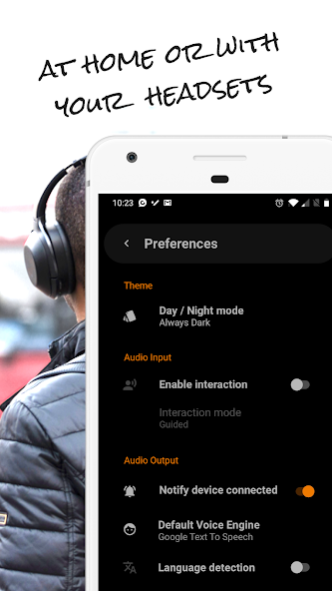
Smart voice assistant to listen, reply and interact with your messages and notifications while driving, staying at home or using your headsets along the street.
💬
Messages reader: Listen and reply to your messages out loud
- Listen to your upcoming instant Messages
- Listen to WhatsApp Audio Voice Notes
- Reply to Facebook messages with your Voice
- Filter messages by Contacts and Languages
- Hands-free WhatsApp and Facebook messages
- Enable or disable messages reading at any moment
🚘
A reader for your Car’s speakers
- Keep your eyes on the road and your hands in the wheel
- Connect to your car’s Bluetooth to listen to your messages
- Chatty will read your new messages and notifications automatically
- Use your car’s media buttons to control messages
🏍️
No distractions while riding your Motorcycle
- Interact with your Apps with your Helmet's Bluetooth
- Control your Music with voice commands
- Listen to reminders of Events from your Calendar
- Stop the messages reading at any moment
🏠
Hands-free at Home or in your Office
- Leave your phone away and interact remotely with your notifications
- Receive updates from your Food Delivery
- Be more productive at your office by multi-tasking
- Control your Alarm with your Voice
🎧
Notifications through your Headsets
- Cross the road safely without looking at your phone
- Hands-free on your bycicle using your headsets and your voice
- Plug-in your wired headsets and listen to your Messages and Notifications
- Use your headset’s media buttons to reply Messages
- Receive updates from your Fitness app while running
Current supported applications:
- Listen to WhatsApp and WhatsApp Business messages aloud
- Listen to Facebook messages aloud
- Interact with Spotify using your Voice
- Receive updates from Netflix
- Integrated with Google Assistant
- Get notified with Events from Google Calendar
- Control your Google Clock Alarm with your Voice
- Keep motivated with Google Fit and Samsung Health
- Track your purchases from Amazon
- Know when your Food Deliveries arrive from Deliveroo and JustEat
About Chatty. Hands-free Messages an
The company that develops Chatty. Hands-free Messages an is Chatty Labs. The latest version released by its developer is 1.0 .
To install Chatty. Hands-free Messages an on your Android device, just click the green Continue To App button above to start the installation process. The app is listed on our website since 2020-11-09 and was downloaded 0 times. We have already checked if the download link is safe, however for your own protection we recommend that you scan the downloaded app with your antivirus. Your antivirus may detect the Chatty. Hands-free Messages an as malware as malware if the download link to com.kuassivi.chattycar is broken.
How to install Chatty. Hands-free Messages an on your Android device:
- Click on the Continue To App button on our website. This will redirect you to Google Play.
- Once the Chatty. Hands-free Messages an is shown in the Google Play listing of your Android device, you can start its download and installation. Tap on the Install button located below the search bar and to the right of the app icon.
- A pop-up window with the permissions required by Chatty. Hands-free Messages an will be shown. Click on Accept to continue the process.
- Chatty. Hands-free Messages an will be downloaded onto your device, displaying a progress. Once the download completes, the installation will start and you'll get a notification after the installation is finished.
Program Details
System requirements
Download information
Pricing
Version History
version
posted on 2020-11-09
We have added new more Apps!, and we have improved stability.
version
posted on 2020-03-06
We have heard you and we have acted.
We have greatly improved the app, adding new features and more compatibility with other applications.
Try it!
version
posted on 2019-06-12
. NEW! - Added Release Notes popup to let you know the latest changes.
. Continuous improvements in the Message Reading Service.
. Avoid restoring App data from Google backup.
. When changing the Reply option in Preferences, the notification is not updated properly.
. Sometimes, the first message in car mode is not read.
. After reading a message, the audio does not return to its normal volume.
version 1.0.2
posted on 2015-11-01
- Listen to your messages by the speakers of your car or your smartphone.,- Press the end call button from your car's wheel to stop playing messages.,- Enable your group messages on ChattyCar Settings.,- Pause ChattyCar from the ongoing notification.,- Google Voice Synthesizer installation problems solved.
Disclaimer
Official Google Play Link
We do not host Chatty. Hands-free Messages an on our servers. We did not scan it for viruses, adware, spyware or other type of malware. This app is hosted by Google and passed their terms and conditions to be listed there. We recommend caution when installing it.
The Google Play link for Chatty. Hands-free Messages an is provided to you by apps112.com without any warranties, representations or guarantees of any kind, so access it at your own risk.
If you have questions regarding this particular app contact the publisher directly. For questions about the functionalities of apps112.com contact us.
